Showing posts with label Sugar. Show all posts

Wednesday, 7 July 2010

20 Graduates from PyXO

Couple of weeks ago, Mohammad Nawahda started a dynamic team to make sure PaleXOers get the proper training about Python to ensure they have what it takes to start developing some great local activities and customizing others. We called it PyXO.

Hanna Kreitem managed to book a room in BZU CCE at Al Masa Building in Ramallah. There, we had 5 three-hours sessions, in which we explored, played with, practiced and hacked around python, GTK and Sugar.


Attendees were around 20 on average. Mostly are PaleXO members, some open source lovers, others joined PaleXO when they learned about what we do. I was amazed of how excited the guys were about Python and enthusiastic about starting building their very first activity and games.


The Python-effect was shown on the guys that came back everyday to learn more and more about it. They simply loved it. Sundous Hussien even started to brainstorm about games and activities that they want to start developing. Simply the idea was to capture and develop kids creativity by creating their future using a game, Sundous calls, Future Time Machine.


Started by introducing Python and it's inline interpreter. Playing around with Numbers, Strings then moving to more advanced structures, Lists, Dictionaries and Tuples. The following picture shows one of my favirote examples, which is calculating big numbers on the fly!


We also moved with learning how to build a Graphical User Interface (GUI) using GTK+ and PyGTK. We also moved on with a real life example by rebuilding Translate Activity that we built sometime ago. Starting with a standalone (non-sugar) program and then move on with how to make it run on Sugar, packaging it and installing it on Sugar.

Now that we are done with the basic training, we hope that software development will be moving much faster in the community and we hope we would come up with some great activities that would help kids learn better.

We will be having some small meetups to play around more with Python and Sugar and to start actually working and implementing some Activities. Meanwhile, we'll start to brainstorm about ideas that can be implemented.

At the end, we really would like to thank BZU CCE, Marwan, Nehad and Hanna Kreitem for helping us getting a place where we can gather and give the sessions.

Want to help? Have Ideas for Activities? Leave us a comment.

Monday, 22 March 2010

Budros Elementary School Visit - Budros, Ramallah

On the 21st of March, we have visited two schools in the west bank which were Khalid Ibn Al Waleed School and Budros School.

Khalid Ibn Al Waleed summary is posted in the previous post.

The teachers at Budros school used the XO laptop with third grade students 5 times before this visit using the old version. The school principle showed us some pictures taken while using the XO laptop and we saw the students happiness and interaction. At the beginning of the visit, we updated around 37 XO laptop and then prepared the classroom with the XOs and cables. The third grade students were very happy to see us and told us that they love the XO laptop and were waiting for us to learn more. Actually, not only the third grade wanted the XO, other students gathered at the door wanting to use it and learn also.


The students told us that they used record activity to take photos of themselves, and the teacher. Also, they used Tamtam activity to hear sounds of animals which was related to a lesson in science curricula. So we tried to show them other activities in the session, and leave others for them to explore.

The teachers likes the XO a lot and believe in its role in improving the students achievements. The math, science, Arabic and English teachers joined the students in the session and used the XO laptop with the students.

We used gifts to make a challenging environment. We used stickers (stars) and candies to award the fastest students in multiple activities. We divided the classroom to two groups and shared two chat activities (Blue and Green). After chatting a little, math and science teachers used these group chat to ask related questions and receive the answers. They students were very excited and started thinking, calculating and writing to answer the first and gain a star and candy.


They shared other activities like write and paint, and learned how to invite a friend to an activity. We asked them to find some facilities in these activities like changing the color, and they were very happy and proud to find it by their own and helping their friends with it.


The students loved Tuxmath activity. They started counting on their hands and typing the answer. The activity is exciting and challenging. Once one student got it, they go and help each other.

We provided 24 new activities on the XO laptops, some of them are math related. The teachers are very anxious to use the XO laptops in their classes. We were very happy to hear the children's feelings towards using the XO and getting it home with them.

We would like to thank Budros team for the great job: Salam Abu Makho, Ala' Allan, Lamees Shalsh and Suhail Taha, Ayman Qarrout, Fayeq Rimawi and Noura Salhi. We enjoyed our trip from Ramallah, passing by Ein Areek and Billin to reach Budros.
Also many thanks and great job for Khalid Ibn Al Waleed team: Mohammad Khatib, Samer Ayesh, Reham, Ahlam, Anas Abdelrazeq, Anissa Yousef, Hanna Kreitem, Mohammed Nawahda, Abdul - Hafeth Salah, Morad Taleeb, Samah Qiwi, Yasmeen Hashem, Abeer Hammad, Raya.

We also would like to recognize some special efforts from: Ayman Qarout and his friend for bringing a projector, Hanna Krietem, with his help in getting the projectors and booking the room for the training session and for taking amazingly inspiring pictures, Tamer Alkhouli and Ala' Abu Nada, who helped with the coordination of the visit, and Noura Salhi for holding the training session for the volunteers.

We would also like to thank Exalt Technologies for buying the candy for the kids, they really loved it, as well as we did. And the ITC at Birzeit University for lending us two projectors.


Khalid Ibn Al Waleed School Visit - Aqraba, Nablus


Today, March 21st 2010, marks our second visits to Palestinian schools in the Westbank. Last Thursday we visited Abu Falah School in Abu Falah village near Ramallah. Today we've been to two schools, a group went to Bodros school near Ramallah, and another to Khalid Ibn Al Waleed School.

I'll leave it to Bodros group to update you with a summary and Pictures.

We were trying a new approach to get the attention of kids by presenting the Sugar interface using a projector. This wasn't as easy as we thought, kids were really distracted by the laptop once they had it and it was hard to convince them to pay attention to the speaker. That was because that was the first time the kids ever saw the XOs!

13 volunteers left Birzeit around 7:30am to Aqraba directly in two seven-passenger caps. I had to go to Ramallah to hand Candy-bags and PaleXO TShirts to the other group. The guys updated the laptops, talked to the kids, played football with them and they even lined up with them in there morning lines and practiced morning exercises with them!


I've joined a bit late due to the fact that I had to go to Nablus first and from I headed to Aqraba. At the time of arrival, they were just about to start eating some meat-stuffed-bread that the teachers and principal of the school got for us along with the drinks. This was extremely nice from them and they were really nice to hang out with.

That was when we started the presentation. We setup the projector while Samar started showing the kids how to open the laptop and how to turn it on (Which they already figured it out by themselves). Then she moved to showing them the 4 views of Sugar and how to navigate between them, explaining what each one is for. This took some time as we expected, as it was the kids' first time to play with the laptop. All PaleXO members were helping the kids in the class follow up with Samar and apply what she was explaining if they couldn't get it.


One of the teacher suggested that we could go outside of the class in a near place called "Sibaryeh", a nice place with some olive trees and a nice view of mountains and Aqraba. We decided to go on an easier and a more fun experience for the kids by dividing ourselves into smaller groups and getting to know the kids more, what they like, and how fast they learn. That was amazingly fun and easier to manage for us and the kids. I even asked the kids who were accompanying me to shoot some pictures of the nature and for their friends while walking to that place, and soon they really got into it and started asking to take pictures of their teachers.


The kids had the chance to experience and play with multiple activities, including Speak, Write, Tuxmath, Arithmatic, Chat, Maze, Memorize, Record and Paint. Though some laptops were missing Tuxmath for some reason (It must be an error during the update process) but it was okay.

This time we've got candy-bags for the kids, they were holding their XO and candy with the same hand and they ate them while playing around with the XO. After finishing, we took the kids back to the school and gave them the chargers, asked them to fill evaluation forms with the help of the volunteers and gave them another evaluation form for their parents to fill.


This has been an amazing visit! Everything was really nice and I couldn't have imagined it any better, although not losing our TShirts bag at the end of the trip would've been nice! (~20 shirts in that bag). We also didn't have much time to go through Aqraba, but it was amazing visiting it, it's a beautiful place and has amazing views of mountains.

This hasn't ended here, the two groups have gathered and had a 14 people lunch at Angelo's Restaurant. This was full of fun, that some people said that it was "the best day in their life!". And I am sure the kids had the same experience as we watched them playing with their friends with the XO.

We would really like to applaud for all the guys who worked hard in this day. Noura Salhi, Salam Abu Makho, Ala' Allan, Lamees Shalash, Suhail Taha, Fayeq Al Remawi, Ayman Qarrout, Mohammad Khatib, Samer Ayesh, Reham, Ahlam, Anas Abdelrazeq, Anissa Yousef, Hanna Kreitem, Mohammed Nawahda, Abdul - Hafeth Salah, Morad Taleeb, Samah Qiwi, Yasmeen Hashem, Abeer Hammad, Raya. And the Teachers and principle of the school who were extremely nice.


We also would like to recognize some special efforts from: Ayman Qarout and his friend for bringing a projector, Hanna Krietem, with his help in getting the projectors and booking the room for the training session and for taking amazingly inspiring pictures, Tamer Alkhouli and Ala' Abu Nada, who helped with the coordination of the visit, and Noura Salhi for holding the training session for the volunteers.

We would also like to thank Exalt Technologies for buying the candy for the kids, they really loved it, as well as we did. And the ITC at Birzeit University for lending us two projectors.

Stay tuned for the Pictures and videos. 

Thursday, 18 March 2010

First Visit To Schools

Today, Thursday March 18, 2010 PaleXO had its first visit to “Ab-Falah” (مدرسة ذكور أبو فلاح) elementary school for boys. The visits aim to teach little kids how to use the XO laptops and deploy them to ease their education and make it more fun. Our first “PaleXO visiting schools” day was long, busy and exhausting but it was worth every smile we saw on the kids’ faces.


The day did not start very well. We first headed to “Al-Fajr Al-Jadeed” school like we were told to do by the ministry. Apparently, the school had no idea we were coming and only 17 out of 72 kids had their XO laptops with them. We were really disappointed since we were all very prepared and excited to have our first visit. We were also expecting Brazilians to accompany us in our visit and planned to meet them in the school. In a try to save the day, and after several phone calls, we contacted the principle of “Abu-Falah” school who also had no idea we were planning to visit his school. Luckily enough for us, the kids in “Ab-Falah” school were not allowed to take the laptops home with them, so we got going to “Abu-Falah”.

We reached the school around 10:00 am. We had 52 laptops that needed updates and only 12 or 13 flash memories. The update process took very long, by the time we were done updating it was 11 something. As a tip for next visits, try to have the updates done a day before or be in the school very early in the morning so that you will have the rest of the day for the activities. After finishing updating the laptops, it was now time to go to the classrooms. We had 52 students divided into 2 classrooms. The Brazilians were contacted back again to meet us in “Abu-Falah” school and were there through all the updating and part of the classroom activities. They were glad to see the progress we are making and told us about their own successful experience with OLPC in Brazil, they also offered to answer any “football” related questions ;-).

Who said that dealing with third graders was fun and easy? Kids in that age are hyper, love to move, play, and ask A LOT of questions … It is not easy to control them like adults or expect them to be quiet. But the one thing for sure about them is they are fast learners and love to explore what is in the laptop. They were happy to see us, and even more delightful to spend time their XO laptops. We had a schedule to follow, but due to the kids’ nature there was a twist in the schedule for the classrooms. Each classroom tried to do as many activities as possible during the 2 hours but did not make it to the half. In spite of all that, the kids were all involved in the activities. They did not wait for our directions but were eager to explore the activities themselves. Some of them were really very smart and were very fast to catch up with us while some were slower; but bottom line is there was not one child that was left out or was not enjoying the experience.

Finally, it was time for evaluation. We handed out the evaluation sheets to the kids to fill in. After that, the class was dismissed and it was all quiet again.

That was the summary of our day, but there are still few things to point out. First, for next school visits we will need more supply. The supply as in flash memories, cables & some treat for the kids. The PaleXO members had to bring this stuff themselves and still were not enough for all the number we had. Second, before each visit we should contact the class teacher and discuss with him/her what the kids already know on the XO laptops so that we won’t waste the day by going over things they already know. I am sure there are more things to consider but these are the things that were on the top of my head.

One more thing worth mentioning is the fact that this trip reminded us with how beautiful Palestine is. We enjoyed the ride along with the green mountains and the olive trees. We also got to know some villages, a refugee camp and settlements that we did not know before.

In the end, I wanted to thank the principles of the 2 schools we visited for their good reception, and the teachers & kids for cooperating with us today. I would love to thank the Brazilians who made the effort to attend our first visit and showed their support. Most importantly I want to thank (ordered alphabetically) Asma, Aya, Ayman, Hanin, Manar, Maysa, Mohammad Khatib, Noura, Rasha & myself Safaa who participated in the actual visit and of course Alaa and Tamer who were supervising for making this day happen. Not to forget “Abu-Faker” the driver who drove us to and from “Abu-Falah”.

It was one GREAT experience; we had so much fun and cannot wait to have our next visit to schools.

Original post by Safa' Halahla on PaleXO FB Fan Page.

Thursday, 13 August 2009

Get your Sugar on a Stick!!


Getting started

We need a few things:
  1. A USB with a minimum capacity of 1GB.
  2. Strawberry iso image, this is actually optional the program we will be using can download it for you in the installation process but it's 379MB, so for a slow connection I suggest you download it as a torrent from here.
  3. The LiveUSB-Creator. Note that this software works both on Windows and Linux.

Let the installation Begin!

The first thing you need to do is extract the contents of the LiveUSB-Creator. Once that's done plug in the USB device you plan to install the image on. Now double click on liveusb-creator.exe, this window should pop up.


Now make sure the Target Device is set to the USB your aiming to install Sugar on.


Next move the slider to set how much space you would like to grant for the storage of Sugar, remember the minimum space required is 1GB. As you can see from the picture below I used the minimum space required.


If you already have the strawberry image, all you need to do is click browse and select the iso image.


If you don't have the iso image, simply select Sugar from the drop down list on the upper right corner.


We're almost there!! Now click the Create Live USB button. If you already have the strawberry image this should only take a few minutes, if you don't it will take quite a while due to the fact it needs to download the image before it can begin the installation.


After the installation is complete you can close the program and try out your Sugar on a Stick. Safely remove your USB but leave it in the port. If your using a desktop it might be better to plug the USB into one of the rear ports for easy detection.

Now you can restart and it should automatically boot in from your USB. If it doesn't then you should check your BIOS settings to make sure that the option for booting from a USB is enabled.

The nice thing about Sugar on a Stick is that the mouse isn't so crazy, it doesn't jump around all the place as in the Live-CD. Also with Sugar on a Stick your work is saved to your USB. But there is a problem with the Arabic language setting, I tried it and some of the words were still in English and some were in Arabic, aslo they used the writing technique where the letters are disconnected, for example ن ظ ا م ا ل ت ش غ ي ل which I find annoying, I only tried the Suadi Arabia choice maybe the others are different I don't know.

Friday, 19 June 2009

Installing Sugar on your non-XO Laptop

There's a couple of ways you can do that, either using Virtual Machines and install the OS on it, or you can just use your already existed Linux distribution and install Sugar on it, so if you are already using any Linux distribution I would recommend that.

I've successfully installed Sugar on Ubuntu 8.10 Intrepid after some troubleshooting. So here's what you need to do in order to get Sugar running on your system.

First, if you don't have Ubuntu 8.10 installed yet, please do install it. Then you need to enable the download manager in ubuntu to install from the main server, as in the following snapshots:

(a)
System --> Administration --> Software Sources.


(b)
Check the Universe repository to enable it, if it is not already enabled.

(c) Set "Download from:" to "Main server".


You may have to enter your password to access it:


Now, Open a Terminal and type the following commands (This will need an internet connection and it might take a while, up to two hours for slow connections):
$ sudo dpkg --configure -a
$ sudo apt-get -f install
$ sudo apt-get --fix-missing install
$ sudo apt-get clean
$ sudo apt-get update
$ sudo apt-get upgrade

Reboot your computer and then type:
$ sudo apt-get dist-upgrade
Reboot again.

After you finish all of the above, you can install Sugar (If you tried installing Sugar before updating and upgrading then you might run into few troubles).

Alternatively you can use the update manager: System --> Administrator --> Update Manager, then click on "Check". Then you will either be prompted to upgrade, or do a partial upgrade, either way continue (Upgrade). If it says your system is up to date then your ready to install Sugar :-). You will also need to enter your password at this point.

Open Synaptic Package Manager, Search for Sugar, then Mark Sugar Package for Install, when you mark it, it will ask you if you want to mark all the things needed, Press Yes, Mark All. Also, mark "sugar-activities". Follow the pictures.


Open the Search menu by clicking the Search button at the top of the Synaptics window.


Then type Sugar in the "Search" field - Make sure that the "Look in" field is "Description and Name".


Then mark Sugar for installation - Note that you may have to scroll down to find it, it doesn't necessarily show at the beginning of the result list even though it should -.


Then Click Apply. (Remember this also needs internet Connection).

When it's all done, reboot your computer. And before you login choose a different session as in the pictures:


Then Choose "Sugar" as your session:


Then Login normally. Vowala! You're all set. Play arround! Some snapshots:


If Activities didn't show on the above figure, then you might want to change the view to the List View, and you can add an activity to the Favirote View you need to star it. You won't have all the activities above, but no sweat you can always install them when your in the mood ;-).

Note that after your done having fun with Sugar, most likely the next time you try to login into Ubuntu you'll be logged into Sugar, this is do to the fact that your "Session" option will be "Last Session" which is Sugar, so don't be fooled by the Ubuntu screen, make sure you click on "Session" & the chosen option is "GNOME" to boot into Ubuntu.


Reference: http://en.flossmanuals.net/Sugar/Installing (Some of the pictures are taken from there too)

Local-Suggestion: I suggest we hold a Sugar Installation Festival in Birzeit University, so the PaleXO members can get it in their Laptops, and anyone else in the University or from schools want to do it on their laptops. What do you think?

Saturday, 4 April 2009

Writing In Arabic in Sugar

To get Arabic Language working on OLPC Sugar OS, follow the following steps:
(For more information please refer to this link).

First of all you have to be a root to use 'yum' package manager, so follow these commands:

$ su
# yum update
# yum install fonts-arabic
....
# yum install scim scim-gtk
...
# yum install scim-m17n scim-tables
...
# yum install m17n-db-arabic.noarch

After doing this, you need now to activate scim at the start of Sugar (the interface of XO laptop), to do so you need to copy this file ~olpc/.xsession-example to ~olpc/.xsession and then configuring it to add some line of code as follow:

# cp ~olpc/.xsession-example ~olpc/.xsession
# vi ~olpc/.xsession

Then add the following lines to the file:

export XMODIFIERS=@im=SCIM
export GTK_IM_MODULE=scim
export USE_XOPENIM=t
scim -d

Now you need to reboot you XO laptop, just type:
# reboot
After booting, Open Browse Activity put the cursor on the text field then hit the HOT KEY for SCIM which is (CTRL+SPACE) a little pop-up window on the right bottom of the screen will show, just change the language to Arabic and start typing, Wohoo, it's writing Arabic characters.

There's one main Problem I am still facing typing in Arabic:
  1. There's some letters don't come in the correct format, for example if you typed "m" Arabic letter followed by "n" Arabic Letter, it won't attach them to each other, instead they will be like separated letters! (See Picture)


This is a good start in Arabizing OLPC. However it still needs a lot of work.

If you have problems in writing Arabic in OLPC, please send us a note we will try our best to help you.

Sunday, 29 March 2009

Arabizing Sugar Interface

To Change your Sugar Interface Language to Arabic you can follow these steps,

7.60-8.20
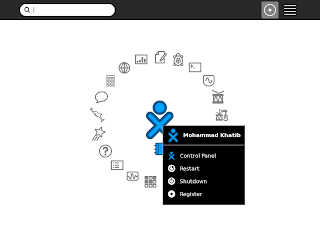
If you are running Build 7.60 (8.20), then it's your lucky day, you can simply roll over your oX in the center of the circle, and Choose Control Panel (As in the Picture). Then go to Languages and choose Arabic. That's All! You need to restart your XO to apply these settings.


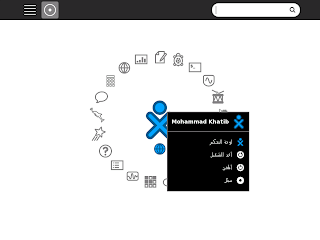
After Rebooting you will notice that it is translated in Arabic as in the Following Image:
Older Versions than 7.60-8.20
If you have older version (Normal Case) then you won't find the Control Panel under the main list of your XO. But, you still can use some commands to do the job. So, Open a Terminal Activity, and type:

# sugar-control-panel -s language Arabic/Lebanon
# reboot

This will change your interface language and will restart your XO.

P.S.
To see a list of available languages, type:

# sugar-control-panel -h language